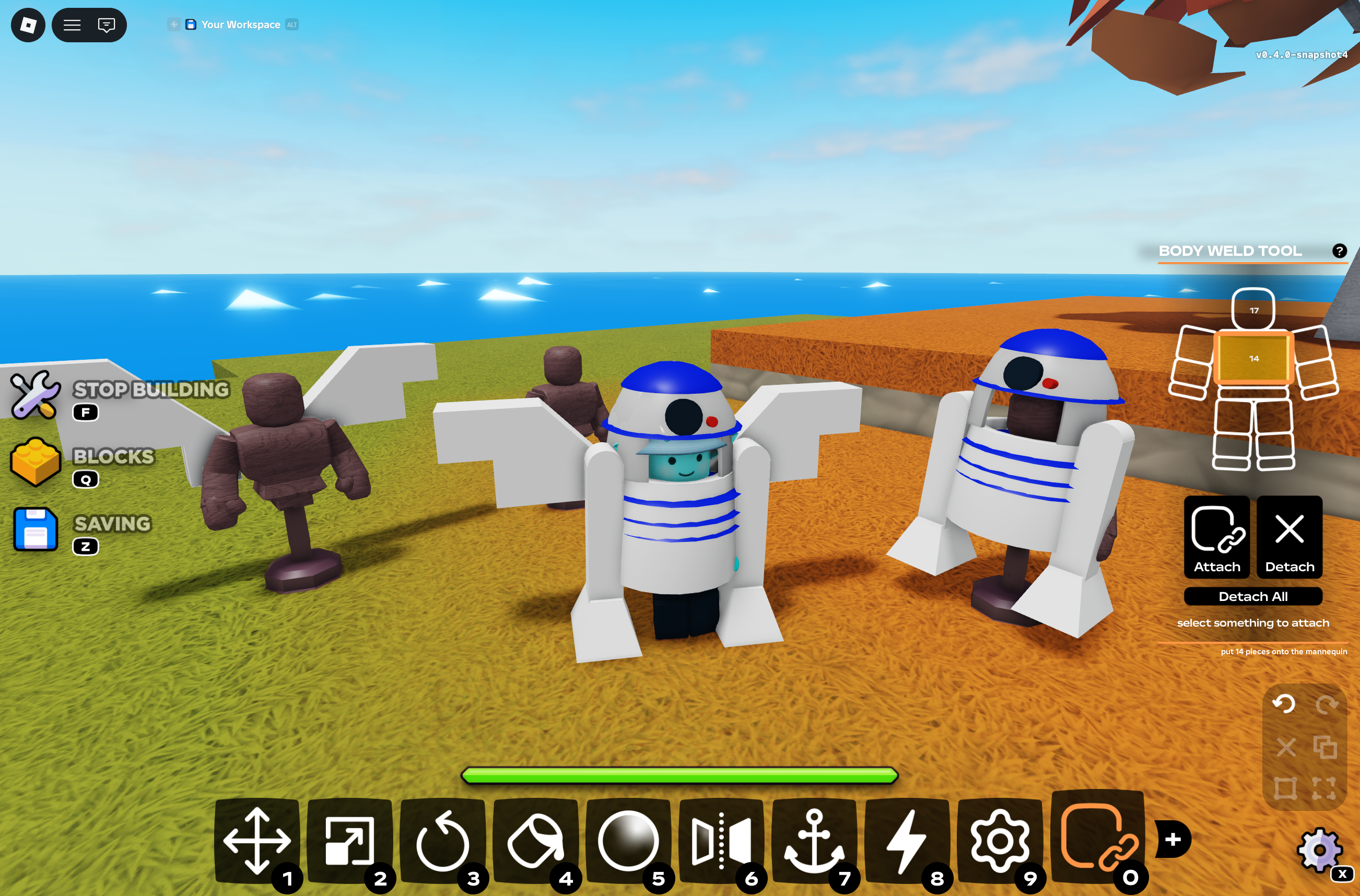

HAPPY HALLOWEEN! in theme with the season, snapshot 4 brings the first official mechanic for equipping blocks to your characters through bodywelding – allowing players to deck out their avatars with custom outfits, costumes, and clothing. mannequins are also an exciting new component that allows bodywelders to save and equip their works of art much more efficiently and easily.
i know it’s much different than original methods, and there is much more we can add to this system with your feedback if need be. i hope it feels like a good revival to a long lost feature that roblox busted a long time ago. not to mention yet another testament to the awesome capabilities components bring to little islands 2! P.S. keep an eye on the discord, i have some halloween fun planned for the events channel.
this is still an experimental build, so be aware that things will likely break, explode, and bug out. please report any feedback to #li2-feedback on discord – i will be watching closely for fixes, thank you!
new features
- added the bodyweld tool
- attach blocks to your character!
- refined attachment to any R15 part
- track all attachments to character and pick and choose
- attached parts return to original spots on detach, reset, and leave
- worn parts stay part of your build, saving to their original spots
- take a piece off to edit it (may allow more flexibility in the future)
- lots of text hints and warnings for the edge cases

- added mannequin component
- dress mannequins with outfits to wear at any time
- using the bodyweld tool, select a mannequin to dress it instead of your character
- using the bodyweld tool, select only the mannequin and attach to copy all your current bodywelds to the mannequin
- equipping an outfit wears a copy (outfits never leave the mannequin unless destroyed)
- any number of players can wear the same outfit
- toggle “anyone can wear” config setting to allow any player to interact with the mannequin
- outfits save & load with your build
wiring
- added multi wiring
- hold left control to continue connecting more wires
- works for both creating inputs and outputs
- can now select multiple of the same setter type to wire continuously
- undo remove one wire at a time
- added additional visual for constraints
- previously just a wire between the two that became hard to select for things like unanchored hinges
- added preview wire that follows your mouse and snaps to the port you would connect to
- can no longer interact with components with a tool equipped (no more accidents!)
- raised delay minimum to 0.2 seconds (was a bit dangerous)
- lamps and setters can now only change at most 5 times a second (same reason as above)
- fixed copying an activated lever or button breaking its animation (handles used to over-swing)

- copying a flipped lever now keeps it flipped instead of snapping to starting position
- interacting with button and levers now have a 0.3 second cooldown (autoclicker moment)
- can now delete wires with ctrl+x (standard delete keybind)
config
- added “stand lock” toggle to seats for easier bodywelding
- fixed missing constraint settings found in setter config but not direct config selection (motors properties for hinges/cylindricals for example)
- config tool now only shows settings that do something in the constraint’s current setup
- angle and length limit options appear only when limits are turned on
- a hinge, slider, or cylinder now shows only the options for its actuator type
- winch options appear only when the winch is enabled
- twist limit options appear only once limits are turned on, and twist angles
- these should reflect in the setter config, but these were specific conditions so please report a bug if not!
- config tool revamp is still on the way, but these are a big start
building
- added right-click spawning from the parts menu
- proximity prompts no longer display when a tool is equipped (seats, vehicle seats, mannequin)
- saved unanchored blocks now load unanchored (previously always anchored)
- please note that saving unanchored parts is still primarily unsupported with the nature of LI2’s encoder – live position updates to unanchored parts will not save unless another tool action is called on it.
- fixed swords and axes moving seats with it (lol)
Leave a Reply